The Thor satellite system, masterfully orchestrated by Space Norway, stands as a beacon of innovation in global satellite communications, illuminating Europe, the Middle East, North Africa (MENA), and beyond with unparalleled broadcasting and connectivity.
Anchored at the prime orbital slot of 0.8° to 1° West, the Thor fleet—comprising Thor 5, Thor 6, Thor 7, Intelsat 10-02, and the forthcoming Thor 8—delivers over 1,000 television and radio channels 📡 to 18 million households.
From vibrant DTH broadcasts to high-speed maritime broadband, Thor is a trailblazer in connecting people, cultures, and industries.
This article dives into the Thor system’s cutting-edge technology, its transformative impact, key frequency details for tuning, and expert tips for seamless reception as of July 2025.
Why Thor Shines Bright 🌟
-
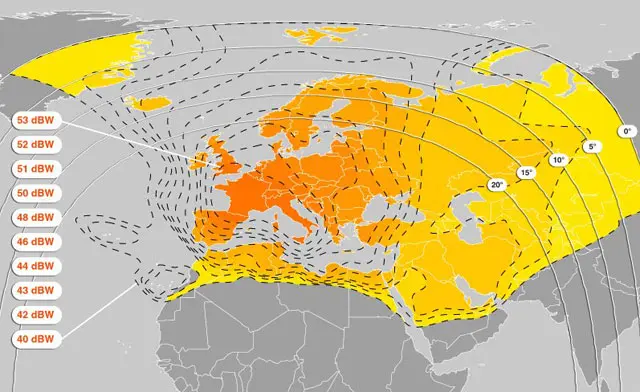
Global Reach 🌍: Blankets the Nordics, Central and Eastern Europe, the Middle East, and maritime hubs like the North Sea, Baltic Sea, and Mediterranean with Ku- and Ka-band beams.
-
Broadcasting Brilliance 📺: Streams crystal-clear HD and SD channels, featuring global giants like BBC, Disney, and Eurosport, captivating audiences with stunning visuals.
-
Maritime Mastery ⚓: Powers high-speed broadband for ships and offshore platforms, boosting crew welfare and operational excellence with 2–6 Mbps uplink speeds.
-
Technological Vanguard 🚀: Harnesses advanced payloads, including Thor 7’s Ka-band high-throughput satellite (HTS) and Thor 8’s dual-purpose design for commercial and government use.
-
Versatile Access 🔓: Offers a blend of free-to-air and encrypted channels, ensuring inclusivity for diverse viewers and broadcasters.
The Thor Fleet: A Constellation of Excellence 🛰️
Space Norway’s Thor satellites are a testament to engineering prowess, evolving to meet the demands of modern connectivity. Here’s a closer look at the fleet as of July 2025:
-
Thor 5 🌠: Launched in February 2008 aboard a Proton-M rocket by Orbital Sciences Corporation, Thor 5 operates on the STAR-2 platform with 24 Ku-band transponders (3.6 kW power). Positioned at 1° West, it powers DTH television and telecommunications across the Nordics, Europe, and the Middle East, remaining a steadfast pillar of the fleet.
-
Thor 6 (Intelsat 1W) 📡: Launched in October 2009 via an Ariane 5 rocket by Thales Alenia Space, Thor 6 leverages the Spacebus-4000B2 platform with 36 Ku-band transponders (16 for Nordics, 20 for Central/Eastern Europe). Stationed at 0.8° West, it succeeded Thor 3, supporting DTH and broadband services, with Intelsat leasing 10 transponders.
-
Thor 7 🌊: Launched in April 2015 by Space Systems/Loral (SSL) on an Ariane 5 rocket, Thor 7 is a multi-mission marvel with 11 Ku-band transponders for broadcasting and 25 Ka-band spot beams for maritime broadband. Covering the North Sea, Red Sea, Baltic Sea, Persian Gulf, and Mediterranean, it delivers 2–6 Mbps uplinks and is positioned at 1° West, with a lifespan beyond 2030.
-
Thor 10-02 (Intelsat 10-02) 🔧: Launched in June 2004 by Thales Alenia Space, this satellite, co-operated with Intelsat, received a groundbreaking mission extension in 2021 via Northrop Grumman’s Mission Extension Vehicle-2 (MEV-2). At 1° West, it supports broadcasting and connectivity across Europe and the Middle East.
-
Thor 8 (Future) 🔮: Commissioned in 2025 from Thales Alenia Space, Thor 8 is a dual-use satellite with Ku- and Ka-band payloads, set for launch around 2028.
-
It will elevate broadcasting in the Nordics and Central/Eastern Europe while enhancing maritime and government connectivity across EMEA, with a 15-year lifespan.
Frequency Guide for Thor Satellites 📡
Thor satellites power Nordic and European broadcasters, delivering channels like Cartoon Network, BBC Earth, and TV2 Hungary.
Frequency for Thor Satellites 📊
|
Satellite |
Frequency |
Polarization |
Symbol Rate |
FEC |
Coverage |
Details |
|---|---|---|---|---|---|---|
|
Thor 5 |
11265 MHz |
Horizontal (H) |
25000 kS/s |
3/4 |
Nordics, Europe, Middle East |
DVB-S2, 8PSK, Canal Digital Beam T1, HDTV/SD, scrambled/free-to-air. 📺 |
|
Thor 6 |
10809 MHz |
Vertical (V) |
25000 kS/s |
3/4 |
Nordics, Central/Eastern Europe |
DVB-S2, 8PSK, HDTV/SD, scrambled/free-to-air, K1/K2 beams. 📡 |
|
Thor 7 |
12245 MHz |
Horizontal (H) |
30000 kS/s |
5/6 |
Europe, Middle East |
DVB-S2, Ku-band, HDTV/SD, scrambled/free-to-air, broadcasting beam. 📻 |
|
Thor 10-02 |
11305 MHz |
Vertical (V) |
27500 kS/s |
3/4 |
Europe, Middle East |
DVB-S2, HDTV/SD, scrambled/free-to-air, Intelsat beam. 📽️ |
Key Information 🔍
-
Coverage Reach 🌍: Thor 5, 6, and 10-02 deliver Ku-band broadcasting to the Nordics, Central/Eastern Europe, and parts of the Middle East. Thor 7’s Ka-band supports maritime broadband in the North Sea, Red Sea, Baltic Sea, Persian Gulf, and Mediterranean.
-
Frequency Precision ✅: Use the listed transponders for current channel lineups. Avoid outdated frequencies like 11785 MHz (Vertical, FEC 7/8) on Thor 5 or 11389 MHz (Horizontal) on Thor 6, which may no longer be active.
-
Emirates TV Note 🚫: As of July 2025, Emirates TV is not broadcast on Thor. For Emirates TV, tune to Nilesat (12226 MHz, Vertical, 27500 kS/s, FEC 5/6, HD, DVB-S2), Arabsat (11804 MHz, Horizontal, 27500 kS/s, FEC 3/4, SD, DVB-S), or Hot Bird (11747 MHz, Vertical, 27500 kS/s, FEC 3/4, SD, DVB-S).
-
Access Options 🔓: Thor offers free-to-air and scrambled channels (e.g., Canal Digital, Allente). Scrambled channels may require a compatible receiver with decryption (e.g., Conax).
Mastering Reception: Tips for Optimal Performance 📡
To capture Thor’s signals (0.8° W or 1° W) with flawless clarity, follow these expert tips for superior reception:
-
Dish Size 📏: Opt for a 70-100 cm dish in the Nordics and Central Europe. For the Middle East or fringe areas (e.g., southern Europe, North Africa), a 100-150 cm dish ensures robust signal strength.
-
Precision Alignment 🧭: Align your dish to 0.8° West or 1° West using a satellite finder or mobile apps. Clear obstructions like buildings or trees for an unobstructed line of sight.
-
LNB Compatibility 🔌: Use a Universal Ku-band LNB (9.75/10.6 GHz) for Thor 5, 6, and 10-02 Ku-band transponders, or a Ka-band LNB for Thor 7’s maritime services. Verify receiver support for DVB-S and DVB-S2.
-
Signal Strength 📶: Aim for 70% or higher signal quality (98% optimal) on your receiver’s meter to eliminate pixelation. Fine-tune LNB skew for maximum performance.
-
Weather Resilience ☔: Protect against signal loss in heavy rain or snow by securing your dish and ensuring LNB caps are watertight.
-
Coverage Verification 🗺️: Confirm your location falls within Thor’s beam (Nordics, Europe, MENA, or maritime zones) for reliable reception.
Tuning Thor Satellites: A Step-by-Step Guide 📺
Adding Thor’s channels to your satellite receiver is seamless with these steps, compatible with most receivers (e.g., Strong, Humax, Starsat), though menu labels may vary.
-
Access the Menu ⚙️: Press “Menu” or “Settings” on your remote, then navigate to “Installation,” “Channel Search,” or “Antenna Setup.”
-
Select Manual Scan 🔎: Choose “Manual Scan,” “Manual Installation,” or “Add Transponder,” then select “Add TP” or “Edit Transponder.”
-
Choose Your Satellite 🛰️: Select Thor 5, Thor 6, Thor 7, or Intelsat 10-02 (Thor 10-02) at 0.8° West or 1° West. If unavailable, manually enter the orbital position (0.8° W or 1° W).
-
Input Transponder Settings 📋: Enter settings from the frequency table (e.g., 11265 MHz, Horizontal, 25000 kS/s, 3/4 for Thor 5). Verify accuracy.
-
Run the Scan 🔄: Press “Scan,” “Search,” or “OK.” Select “FTA Only” for free-to-air channels or “All Channels” for all options. Wait 1-3 minutes for completion.
-
Save Channels 💾: Press “Save” or “OK” to store channels like “TV2 HD” or “BBC Earth” in your list.
-
Fine-Tune Signal 🔧: Adjust dish azimuth and elevation if the signal is weak, targeting 70-98% strength. Check LNB skew and cables.
-
Test Playback 📺: Select a channel to confirm clear playback. Consult a professional installer if issues persist.
Receiver Tips 🔌:
-
Enable “LNB Power” on Strong receivers (e.g., SRT 4950) in the “Transponder” menu.
-
Set LNB to “Universal” for Ku-band or specify Ka-band for Thor 7 on Humax or Starsat.
-
Use default PINs (e.g., 0000, 1234) if prompted; check your manual.
Thor’s Global Impact and Future Horizon 🌟
The Thor satellite system redefines connectivity and broadcasting:
-
Broadcasting Powerhouse 📡: Streams over 1,000 digital TV and radio channels via platforms like Allente, serving broadcasters like Viacom, Disney, and TV2 Hungary.
-
Maritime Innovation ⚓: Thor 7’s Ka-band delivers 2–6 Mbps broadband to ships and offshore platforms, enhancing crew welfare and operational efficiency.
-
Sustainability Pioneer ♻️: Thor 10-02’s 2021 mission extension via MEV-2 set a global benchmark for satellite servicing, extending life and reducing debris.
-
Thor 8’s Vision 🔮: Launching in 2028, Thor 8 will bolster Ku- and Ka-band services, supporting broadcasting, maritime, and government needs with a 15-year lifespan.
-
Integrated Ecosystem 🌐: Combines satellite, fiber, and terrestrial networks, supporting initiatives like Project Greensand for carbon storage in the North Sea.
Freq Wave is committed to providing users with comprehensive frequency lists, the latest channel news, and step-by-step guidance for optimal reception. By combining expert insights with simple instructions, we ensure that both beginners and advanced users can tune their receivers efficiently and enjoy consistent signal quality.
Tips for Strong and Stable Signal – Freq Wave
- Align your dish accurately using a signal meter for maximum performance.
- Use high-quality coaxial cables and secure connections to prevent interference.
- Place the dish in an open area free of obstructions like trees or buildings.
- Regularly check and maintain the LNB to avoid signal degradation.
- Update your receiver settings whenever new frequencies are announced.
📡 Freq Wave — Your trusted guide for uninterrupted satellite reception and accurate channel updates.
Freq Wave was created to serve as a comprehensive and reliable reference for everything related to satellite broadcasting. From the latest frequency updates and channel news to detailed tuning instructions and signal optimization tips, the platform is designed to help users of all experience levels achieve the best possible reception and enjoy crystal-clear picture quality at all times.
As satellite technology continues to advance and broadcasting standards improve, regular follow-up becomes more important than ever. Missing a single update may result in losing access to a favorite channel or experiencing signal instability. That is why we focus on delivering timely updates supported by clear explanations and practical guidance, ensuring that every user can easily adjust their receiver settings without technical complexity.
Advanced Tips for Strong and Stable Signal Reception – Freq Wave
- Fine-tune the dish alignment carefully and recheck it periodically to maintain maximum signal strength.
- Use high-quality cables, connectors, and splitters to reduce signal loss and avoid interference.
- Install the satellite dish in a clear, open location with an unobstructed line of sight to the satellite.
- Verify frequency values, symbol rate, and polarization before saving them in the receiver.
- Inspect the LNB regularly and replace it when signal fluctuations or quality drops are noticed.